POGO Support Help Center home page
Submit a request
Sign in
  1. POGO Support
  2. FAQs
  3. Pin Sheets

Articles in this section

  • How can I print a Pin Sheet?
  • How can the public access my Pin Sheet report?

How can I print a Pin Sheet?

  • June 19, 2019 21:12
  • Updated
  1. Log in to www.pogoturfpro.com.
  2. Click the Pin Sheet module.
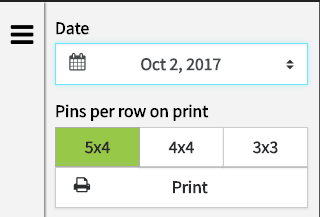
  3. The left pane of the screen contains options for setting up the pin sheet and a Print button.

Screenshot_2018-06-27_12.26.27.png

Was this article helpful?
0 out of 6 found this helpful
Have more questions? Submit a request
Return to top

Related articles

  • How can the public access my Pin Sheet report?
  • Using Pin Sheets
  • Sensor Diagnostic
  • POGO Mapper Info Sheet
  • Set a Pin
POGO Support